Trend · 7-second video meme
Bicep Heart AI
Upload one photo of an adult and do the bicep heart trend yourself: a shy smile, a quick arm rub, then the flex, with your other hand curling over the bicep into a heart, timed to the trend sound. Ready in about 7 minutes.
Your photo is deleted when the video is done (within 1 day at most). Privacy
1 · Pick a dance
All 13 AI dances →2 · Add your photo
3 · Make it
Your first video$7.99$9.90then $9.90 · one-time
10 credits per video · Credits never expire · Secure checkout by Stripe
No app · No watermark · Failed videos refunded
Independent fan-made tool, not affiliated with the original creators or anyone in the clip. Source clips are cropped, blurred or recreated so that no identifiable bystanders appear. Celebrities, public figures and minors are not allowed in uploaded photos; blocked uploads are refunded automatically. Operated by the Star in the Trend team (hello@starinthetrend.com). Takedown requests
At a glance
- You upload
- One sharp, front-facing photo of one adult. Upper body or full length, with your arms in view.
- You get
- A 7-second MP4 in portrait HD 992×1728, with the trend sound.
- Wait
- Roughly 7 minutes, and the finished link is emailed to you as well.
- Price
- $7.99 for your first clip, then $9.90 each, nothing recurring.
- Preview
- There is no free trial render. The test clip below is untouched output, and if a render fails your credits are refunded on their own.
- Kept
- Your photo is erased as soon as the clip exists; the MP4 waits in My videos for seven days.
What is the bicep heart (biceps heart) trend?
The bicep heart is a short, sweet flex. You start a little bashful, rub your arms, then raise one arm and flex it. Your other hand comes up and curls over the top of the bicep, and together they make a heart. You hold it and smile at the camera.
It took off on TikTok in the first week of November 2026, with couples and big creators posting their own takes within days, and Google searches for "bicep heart" went from almost nothing to their peak in two or three days. Photo apps such as CapCut and Hypic added a still-image bicep heart effect around the same time.
This page makes the video version with you in it. The person in your photo takes the place of the dancer in the original clip and does the same moves on the same beats, so it works as a reply to a friend's post, a couple's joke or your own feed.
- Early Nov 2026Bicep heart videos spread on TikTok, from couples to large creator accounts.Source: TikTok
- Nov 2026CapCut and Hypic tutorials for a still-photo bicep heart effect appear in several languages.
- Nov 5–7, 2026Searches for "bicep heart" jump from near zero to their highest point so far.Source: Google Trends
Second by second
| Seconds | What happens | What it needs from your photo |
|---|---|---|
| 0–2 s | A shy smile, hands loosely together in front, a little sway. | A sharp, front-facing face keeps the smile yours. |
| 2–3.5 s | Arms cross and rub the upper arms, the wind-up before the flex. | Arms in view, not cropped out of the photo. |
| 3.5–7 s | One arm flexes, the other hand curls over the bicep into a heart, and you hold it with a grin. | A T-shirt or top that shows your arms looks most natural. |
What this version does and does not do
- Does: the original clip's moves, timing, framing and room, with you as the person in it.
- Does not: make a still photo. You get a video of the whole move.
- Does not: change your outfit or body. You keep the clothes from your photo.
- Does not: copy your background. Every clip keeps the original's teal-walled room.
How to make your bicep heart video
- Bicep Heart is already chosen in the tool above.
- Use a clear, front-facing photo of one adult, upper body or full length, with your arms in view.
- Tick the box to confirm the photo is yours or that the adult in it said yes, sign in, and press Make my dance video. About 7 minutes later the clip is ready and an email tells you so.
- Download the MP4 from My videos, where it is kept for seven days, and post it with the sound up.
How we tested the bicep heart clip
The person below is AI-generated, not a real person. The clip is the unedited output before the HD upscale, so yours comes out sharper.
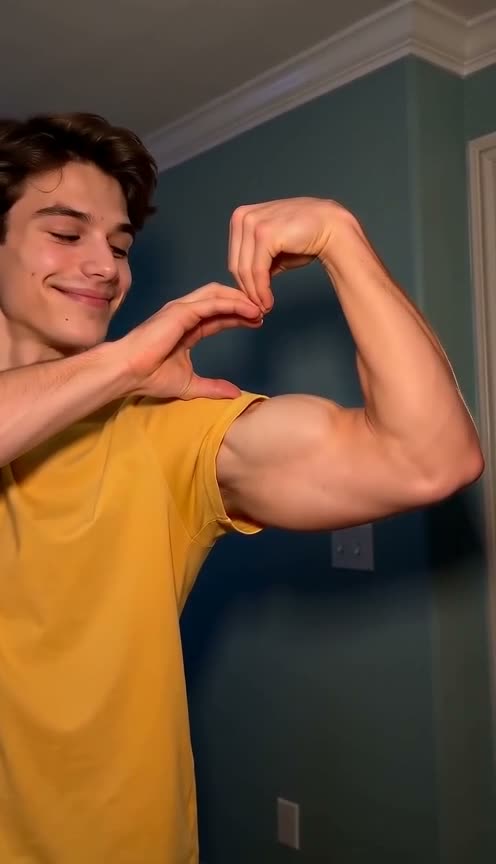
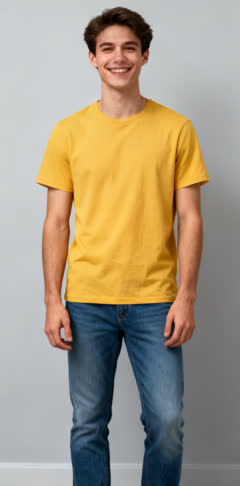
The heart is the detail to watch: a photo where both arms are free gives the model the most to work with.
How it compares
| This page | Prompt-based AI dance generators | CapCut-style templates | |
|---|---|---|---|
| What you give it | One photo | A photo and a typed description of the pose | A photo, inside a photo-effect app |
| The result | A video of the flex and the heart, timed to the trend sound | Whatever the model makes of your prompt | A still picture of the heart pose |
| Sound | The trend sound | Often none | None (it is a photo) |
| Cost | $7.99 first video, then $9.90 | Monthly plan or credit packs | Usually free inside the app |
| Wait | About 7 minutes | Varies by service | A few seconds |
Photo-effect apps are the quick way to get a still bicep heart picture. This page is for when you want the moving version without filming it.
Price
One bicep heart video: $7.99 if it is your first, then $9.90; packs on the pricing page.
Last updated · tested on 1 AI-generated people
Not affiliated with TikTok, CapCut or Hypic. The original clip's creator is not involved with this site; your video shows you, not the person in the original.
Bicep heart AI questions
What is the bicep heart trend?
A TikTok trend from November 2026: someone flexes one arm, then curls the other hand over the top of the bicep so the arm and hand make a heart shape, and holds it with a grin. Couples and creators piled in within a few days. You will also see it written as the biceps heart trend; it is the same move.
Is this the photo effect from CapCut or Hypic?
No. Those apps turn a photo into a still bicep heart picture. Here you get a video: the whole move, from the shy start to the flex and the heart, with the trend sound.
Do I need big arms?
No. The flex and the heart follow the original clip, and your face, hair and clothes come from your photo. A T-shirt or a top that shows your arms looks most natural.
Which photo works best?
One adult, facing the camera, face sharp, upper body or full length in view, arms not hidden behind anything.
Can I make one for a friend?
Yes, as long as your friend is an adult and said yes; the tool asks you to confirm that each time. Photos of children, celebrities and public figures are turned away.
How long is the video?
7 seconds, portrait HD 992×1728, with the trend sound.
How much is a bicep heart video?
$7.99 for your first clip, after that $9.90 each (10 credits). Nothing recurring; larger packs sit on the pricing page, and a failed render refunds its credits automatically.