Christmas · 10-second green monster dance
Grinch Filter
Go green, grab a Santa hat and dance
Make yours · 3 steps
Step 1 of 3
Add one photo of yourself
One adult, face sharp, full body if you have it.
Choose your elf style
10 credits per video · Credits never expire · Secure checkout by Stripe
No app · No watermark · Failed videos refunded
$7.99 first video, then $9.90 · 10 credits · failed videos refunded
Independent fan-made tool, not affiliated with the original creators or anyone in the clip. Source clips are cropped, blurred or recreated so that no identifiable bystanders appear. Celebrities, public figures and minors are not allowed in uploaded photos; blocked uploads are refunded automatically. Operated by the Star in the Trend team (hello@starinthetrend.com). Takedown requests
Upload one photo and this Grinch filter turns you into a green, furry holiday monster in a red Santa coat, then makes you dance in front of the Christmas tree. It is still your face, painted green, and your whole body moves, in a portrait video ready for TikTok, Reels or the family chat. No app, no prompts, no editing.
Adults only. Your photos are deleted when the video is done (within 1 day at most). Privacy
At a glance
- You upload
- One photo of one adult, full body if you have it.
- You get
- A 10-second portrait MP4, upscaled to HD 960×1664: you as a green furry monster in a Santa hat and coat, dancing in a Christmas living room, with music.
- Wait
- About 6 minutes. Your green photo shows up after the first minute, and we email you when the video is ready.
- Price
- $7.99 for your first video, then $9.90, no subscription.
- Preview
- No preview video before you pay. Watch the unedited test videos below first; if a video fails, the credits come back automatically.
- Kept
- The video stays in My videos for 7 days. Your photo is deleted as soon as it is made.
Grinch yourself in three steps
- Your photo · Add one photo of yourself: one adult, face sharp and toward the camera, full body if you have one, since the whole body dances.
- Check & agree · Confirm you are an adult and that it is your photo or you have permission, then pay.
- Make it · In about a minute you see yourself as a green monster; a few minutes later the dancing video is ready to play and download.
Before and after: the same photo, three steps
Most Grinch filters stop at a green selfie. Here the green photo is the middle step: first an AI image model paints your face green, adds the fur suit, the Santa hat and the coat, then a video model makes that green version of you dance. Both people below are AI-generated test models, not real people.
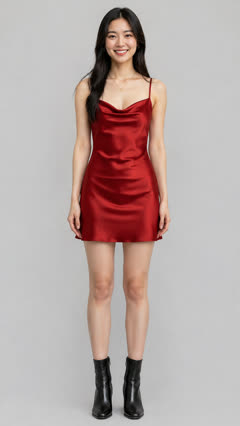
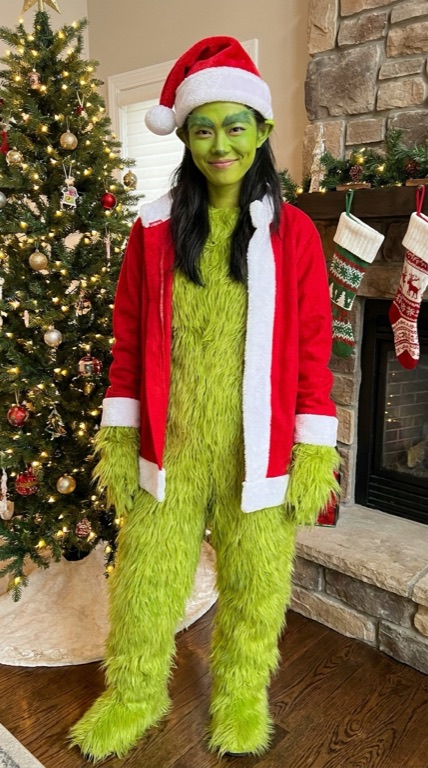
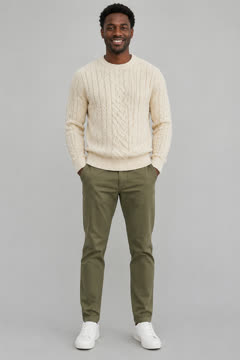
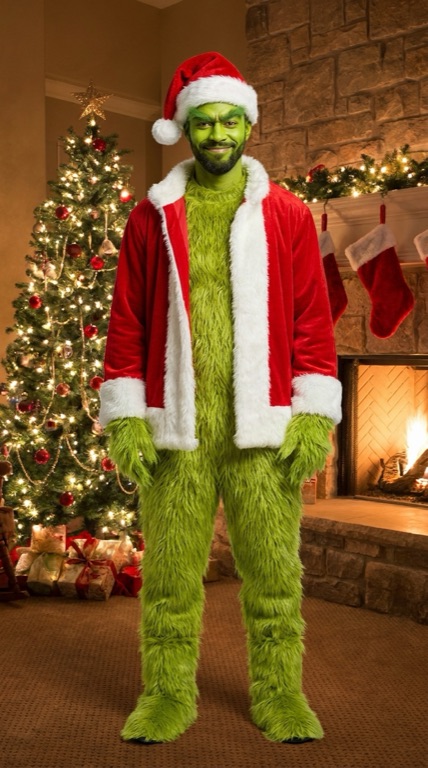
Look at the faces: his beard and grin, her long black hair and smile come through the green paint. What changes is everything below the chin. Your own clothes are replaced by the fur suit, so the outfit in your photo does not matter much.
How we tested
The two people below are AI-generated, not real people. The videos are unedited output from the same models your video goes through, shown at 480p before the HD upscale that your video gets. Each green photo took under a minute and the dance about 4 minutes.
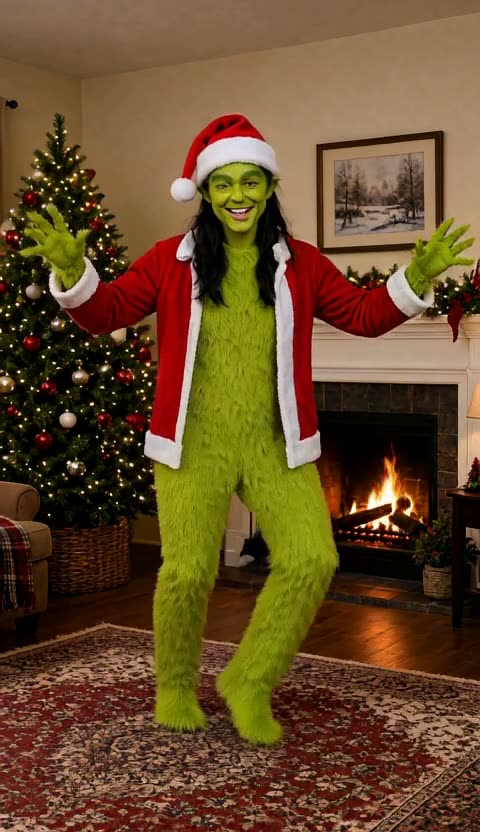
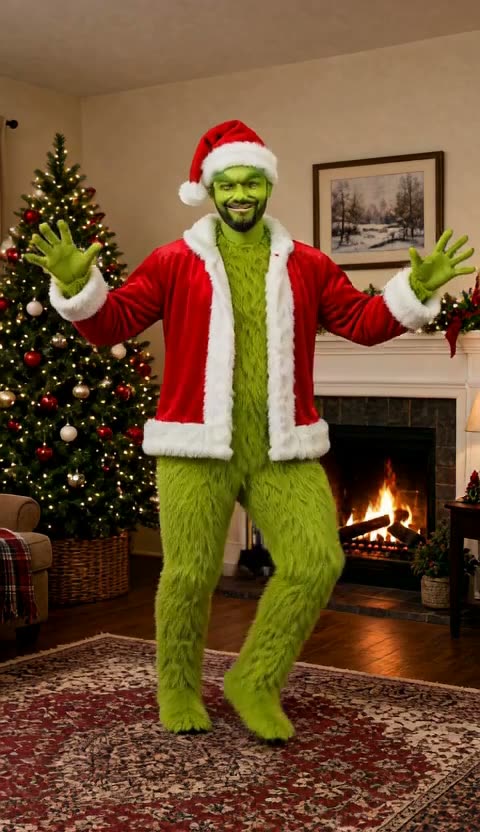
The dance, second by second
| Seconds | What happens | What it needs from your photo |
|---|---|---|
| 0–2 s | A knee-up kick with both furry arms thrown wide and a big grin. | Leave space around you in the photo; the arms reach the edges. |
| 2–4 s | Bouncy side steps with jazz hands toward the camera. | A sharp, front-facing face; this is the closest look at you under the paint. |
| 4–5 s | The high kick: one fur boot goes up past the hip. | A full-body photo, so the legs are not cropped. |
| 5–6 s | A quick spin with the back to the camera, coat flying open. | Nothing extra; the costume covers your back. |
| 6–10 s | Arms wide, a shoulder shimmy and a last pose with one glove raised. | Your smile carries the ending; it is the part people screenshot. |
What this Grinch filter does and does not do
- Does: paint your own face green and dress you in a full fur suit, Santa hat and red coat, then make your whole body dance.
- Does: keep your face shape, smile and hairstyle, so friends can tell it is you.
- Does not: give you yellow eyes, a cartoon face or the look of any film or book character. It is a generic green holiday monster made from your photo.
- Does not: keep your own clothes or background, or let you pick the song or the moves.
- Does not: put two people in one video, or take photos of children, celebrities or anyone who hasn't agreed.
- Does not: do voices. There is no Grinch voice or narration, only an original holiday instrumental.
Grinch filter apps or a dancing video?
If you want a live green face on your camera, the free Grinch-style lenses in Snapchat and the photo filters in CapCut, Fotor and OpenArt are the quicker pick, and most cost nothing. This page is for a different result: your whole body, not just your face, in a short video that moves.
| This page | Free photo filters | |
|---|---|---|
| What you get | A 10-second dancing video | A still photo or a live lens |
| Body | Your face painted green on a full fur suit | Mostly the face, sometimes a costume overlay |
| Where | Any browser, no app | Snapchat or CapCut app, or a website |
| Price | $7.99 for your first video, then $9.90, one-time | Usually free, some with watermarks or credits |
A filter gives you a green selfie. This page gives you the clip people replay in the group chat.
Photo rules and adults only
- Just you. The Grinch filter makes one green monster per video, so crop out anyone else; children, celebrities and public figures are never accepted.
- Your own photo, or one the person in it agreed to. Before you pay, you tick a box to confirm it.
- Head to feet if you can: the high kick and the spin need legs. From the waist up still works, but the legs are made up.
- Your face is what survives the green paint, so pick a sharp shot in daylight, looking at the camera, with no sunglasses.
- When the image model can't paint a photo green, the job ends before the dance and your credits come back.
Price
One Grinch filter video: $7.99 if it is your first, then $9.90. Packs are on the pricing page. No subscription and nothing renews.
Published · Updated · tested on 2 AI-generated people
Not affiliated with, endorsed by or connected to Dr. Seuss Enterprises, Universal Pictures, Illumination or any Grinch book, film or product. "Grinch" is used only to describe what people search for. We do not use official artwork, film stills or character designs: the green monster look is generated from your photo, the dance in our reference clip is performed by AI-generated people, and the music is an original track.
Grinch filter questions
How much does the Grinch filter cost?
$7.99 for your first video, then $9.90 per video (10 credits), or 30 credits for $22.99 and 50 for $37.99. You pay once: there is no subscription, credits never expire, and if a video fails, the credits come back automatically. You can watch our unedited test videos on this page before you pay.
Is this the official Grinch?
No. It is not connected to Dr. Seuss Enterprises or the films, and it does not copy the character. You become a generic green, furry holiday monster in a Santa hat and coat, with your own face under the green paint.
Is this a Grinch AI voice or picture generator?
Neither, exactly. Most Grinch AI tools either copy the voice or draw a still picture from a prompt. This AI Grinch filter starts from your own photo, turns you green and furry, and gives you a short dancing video with music. There is no Grinch voice: we do not clone character voices.
How does the Grinch filter work?
Upload one clear photo of one adult, confirm and pay. An AI image model paints your face green and dresses you in the fur suit, Santa hat and coat, then a video model makes that green version of you dance. It takes about 6 minutes in a phone or computer browser and gives you a portrait 9:16 HD MP4 of 10 seconds with an original holiday instrumental.
Do I get the green photo too?
The green photo shows on screen while your video is being made, and you can save it from there. What you download at the end is the video. If you only want a still green selfie, a free photo filter is the better fit.
What kind of photo works best?
One adult, a sharp front-facing face in good light, full body if you have it. The green paint goes over your own features, so a clear face is what keeps it looking like you. Sunglasses, heavy filters and faces turned away make it look like someone else.
Can I make one with my kids or my whole family?
No. Each video has one adult, and we do not accept photos of children. For a couple or friends, make one video each; for an elf video with up to three adults, use the elf video maker.
What happens to my photo?
It is used for this one Grinch video and nothing else. Your browser shrinks it before upload, it sits in private storage while the AI services that paint you green and animate you work on it (they are named in our Privacy Policy), and it is deleted the moment the video finishes or fails, never later than 1 day.
Does it work on a phone, and can I post it on TikTok?
Yes. Pick a selfie from your camera roll, pay with Apple Pay or a card, and save the finished clip to your phone from the same page; the link also arrives by email. It is already portrait 9:16, so this Grinch filter video goes straight into TikTok, Reels or Shorts without cropping.
How long is the Grinch video, and what music is in it?
10 seconds, upscaled to HD 960×1664, with an original upbeat holiday instrumental made for this dance. There is no Grinch voice and no film soundtrack.
What if the green version does not look like me?
If a photo can't be turned green, the video stops before the dance and the credits come back automatically. Unused credit packs can be refunded within 14 days of purchase; see the Refund Policy. A sharper, front-facing photo is the best fix before you try again.